Practice · 7 November 2026 · 4 minute read
Contact form in B2B: fields, data protection, spam
Contact form for B2B websites: which fields, required information, privacy notice, spam protection without captcha, confirmation and alternatives to the form.
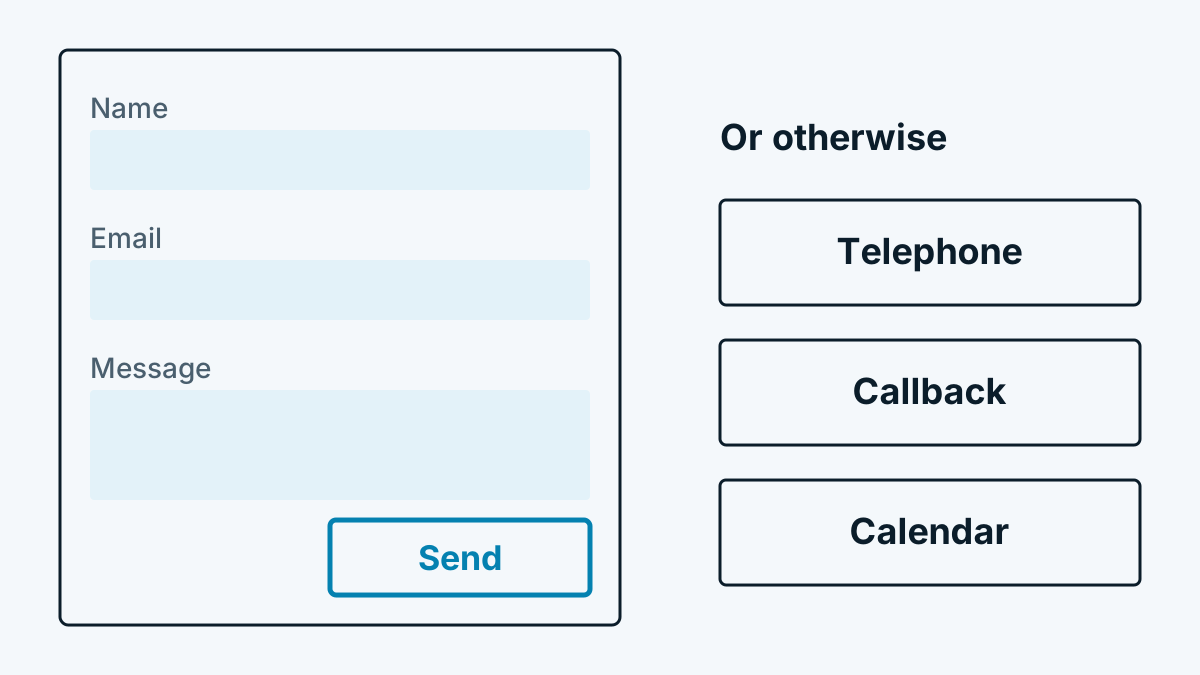
For many B2B websites, the contact form is the most important place of all. This is where it is decided whether a visit becomes an enquiry. At the same time this is where the most can go wrong: too many fields, an unclear privacy notice, spam in the inbox, no reply. This article goes through the building blocks one by one.
Which fields does a form need?
Every additional field can cost enquiries. There is no fixed figure for this, but you can test it on your own site: simplify the form and compare the number of enquiries over a few weeks.
To start with, this information is usually enough:
| Field | Required? | Note |
|---|---|---|
| Name | Yes | One field is enough, separate fields for first and last name are rarely necessary |
| Email address | Yes | Without it you cannot reply |
| Message | Yes | With a hint on what helps, such as „What is it about, by when?“ |
| Company | No | Helps with classification, but must not block anything |
| Phone | No | Only as an optional field, with a note on the purpose (callback) |
Mark required fields visibly. Leave out questions you do not need for the reply. This is also a data protection matter: under Art. 5(1)(c) GDPR, data should be limited to what is necessary (GDPR, EUR-Lex).
Privacy notice at the form
Anyone who collects personal data must inform people at the time of collection (Art. 13 GDPR). The usual approach is a short sentence below the button with a link to the privacy policy: what the data is used for (processing the enquiry), how long it is stored and who receives it.
Two points are often done wrong:
- No forced consent for the newsletter. A tick box for advertising must be voluntary, separate and not pre-ticked. More on the rules in B2B newsletter: consent, double opt-in, unsubscribing.
- Do not use enquiry data for advertising. Anyone who makes an enquiry wants a reply, not a series of promotions.
The privacy policy should also state where the form technically runs (own server or service provider).
Spam protection without a captcha requirement
Spam is annoying. A puzzle before sending, however, costs real enquiries. Better ways:
- Hidden field (honeypot). A field that people cannot see. If it is filled in, it was a program.
- Time check. If the form is submitted in under two seconds, it was not a human.
- Server-side check. Limit the number of submissions per address per minute and check content, for example many links in the message.
- A captcha only as a last stage, if the methods above are not enough. Many captcha services load scripts from third parties. That may require consent or a contract.
Test your protective measures with a real test enquiry from a phone. If it is wrongly blocked, you have a problem you would otherwise never notice.
Confirmation and response time
After sending, the visitor needs a signal:
- Confirmation on the page. Ideally a separate thank-you page with its own address. The enquiry can then be counted in statistics later.
- Confirmation by email. Short, free of advertising, with a note on when you will reply.
- Quick reply. The time to first response counts. Decide internally who reads the inbox and by when replies are sent. A promise such as „on the same working day“ is more honest and easier to keep than „within an hour“.
Alternatives to the form
Not every prospect wants to fill in a form. Also offer:
- A phone number, tappable on mobile, with availability hours.
- A callback request with just one field: number and preferred time.
- Appointment booking via a calendar, if you hold calls. Check where the service stores the data.
- A direct email address for people who prefer to write.
How forms fit into the bigger picture of the site is shown in B2B lead generation through your website: 9 ways. An all-round look at the site is offered by the B2B website check with 15 points.
Frequently asked questions
How many fields are ideal? There is no fixed number. Start with name, email and message and add only what you really need for the first reply. Measure enquiries before and after the change.
Do I need consent for the contact form? For processing an enquiry, consent is generally not needed, because you need the data to answer it. For a newsletter or advertising you need separate consent. If in doubt, have your data protection adviser confirm it.
Should I build in a captcha? Only if honeypot, time check and server-side check are not enough. A captcha deters genuine prospects and can raise additional data protection questions.