Comparison · 7 November 2026 · 5 minute read
Visitor identification comparison: features at a glance
Slack, Teams, CRM, lead scoring, video, API and contact data at eight providers: what is in which plan and what is not stated. With sources.
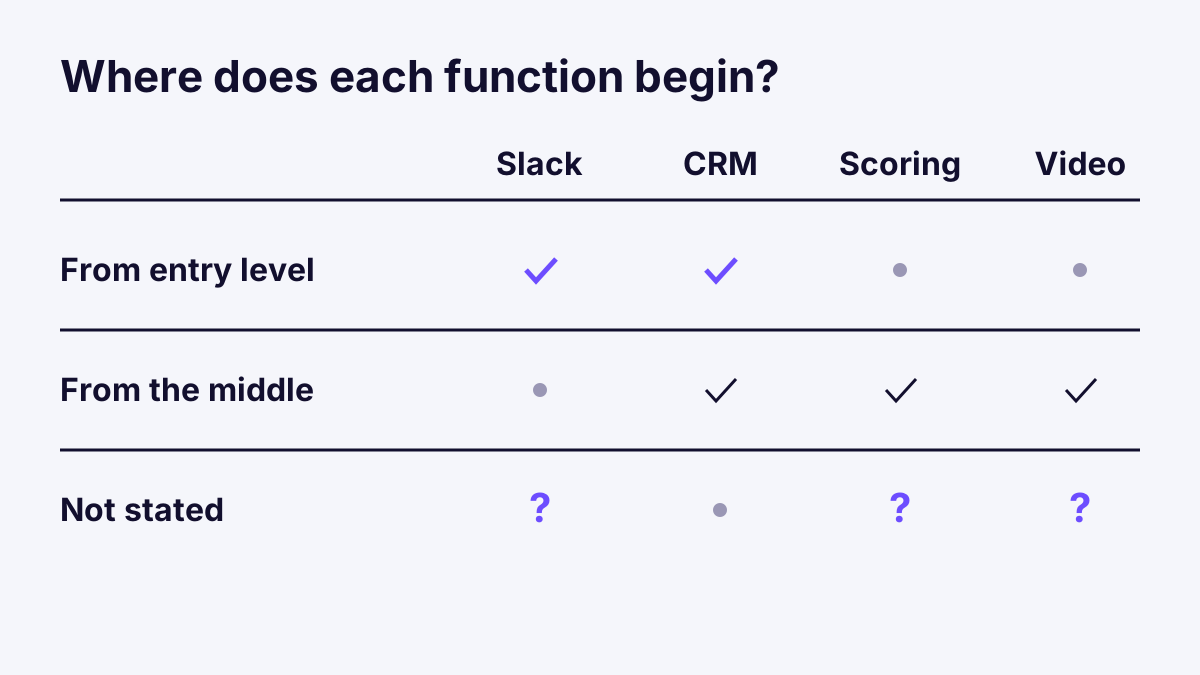
Prices are quickly compared. The harder question is what you get for them. With visitor identification, the benefit depends less on the identification itself than on what happens afterwards: does the alert reach the team? Does the company end up in the CRM? This article sets seven functions at eight providers side by side. Where a provider page does not mention something, it says „not stated“. That does not mean the function is missing, only that it could not be substantiated on the pages checked. Prices are in Visitor identification price comparison 2026.
The functions in a grid
The tables show in which plan a function begins. Prices and counting methods differ by provider, so only plan names appear here.
| Function | SalesViewer | Leadfeeder | Leadinfo | Albacross |
|---|---|---|---|---|
| Instant alert | from Pro | from Discover | not stated | not stated |
| Slack and Teams | not stated | not stated | yes according to the home page, pricing page does not mention them | from Starter |
| CRM | integrations according to the provider, list not checked | from Discover (sync) | 67 integrations, sync from Scale, Salesforce from Pro | Pipedrive from Starter, HubSpot from Professional, Salesforce only Organisation |
| API and export | export from Pro, API from Premium | API and MCP from Discover, company export free only in Scale | not stated | CSV from Professional, API „on request“ |
| Lead scoring | from Premium | not stated | from Starter | according to the home page „Signal“ with Hot, High, Medium |
| Mouse video | from Premium | not stated | from Scale, 7 days | not stated |
| Contact data | decision-maker contacts mentioned, costs not stated | verified emails and phone from Activate, via credits | from Starter, mobile numbers from Pro | via credits, included in the plan are 10 emails and 5 phone numbers in Starter |
| Function | Snitcher | RB2B | Webmetic | Whovisit |
|---|---|---|---|---|
| Instant alert | in all plans (Slack, email) | not stated | not stated | in all plans |
| Slack and Teams | in all plans | Slack from Free, Teams according to the table, page inconsistent | according to the provider from Starter | in all plans |
| CRM | in all plans (HubSpot, Salesforce, Pipedrive, others) | from Pro | CRM integrations from Starter | via API and webhooks in all plans, direct HubSpot and Pipedrive connections planned |
| API and export | API and webhooks in all plans, export not stated | webhooks and CSV from Pro | API and list export from Starter | API, webhooks, CSV in all plans |
| Lead scoring | mentioned | „Hot Pages“ from Pro | not stated | interest 0 to 100, important pages with instant alert |
| Mouse video | not stated | not stated | from Growth | in all plans |
| Contact data | enrichment, costs not stated according to the page | emails for US persons from Pro | 50 contact credits in Starter | not available |
Sources: SalesViewer, Leadfeeder, Leadinfo, Albacross, Snitcher, RB2B, Webmetic, each retrieved on 7 November 2026. The plan statements come from the provider pages and may change.
What the rows mean
Instant alert, Slack and Teams. A list only helps if someone opens it. An alert at an important visit reaches the right person by itself. For Slack and Teams, a look at the plan row is worthwhile: Albacross and Snitcher offer both from the smallest plan, while with Leadfeeder instant alerts only begin with Discover.
CRM. This is where the biggest differences lie. Snitcher lists HubSpot, Salesforce and Pipedrive in all plans. With Leadinfo, automatic sync is only possible from Scale, and in the Starter plan you send companies by hand. With Albacross, it depends on the plan which CRM you can use. Without a direct connection, webhooks and services such as Zapier remain, as described in Webhooks explained simply: signature, retries, security. Four ways compared are shown in Getting website visits into the CRM: 4 ways compared.
API and export. For your own analyses or a data warehouse, the interface counts. SalesViewer puts it in the middle plan, Snitcher in all plans. Export is the simpler variant and is included early with most providers.
Lead scoring. A value per company sorts the list by closeness to purchase. The methods differ: SalesViewer and Leadinfo rate, Albacross uses a grading from Hot to Medium, RB2B marks important pages. How a simple model is built is covered in Lead scoring in B2B: a simple model from website signals.
Mouse video. Recordings show how visitors move on the page. They need consent and care, see Session replay and data protection: using mouse recordings properly.
Contact data. Several providers supply contact persons with email and phone for the identified company, mostly via credits. That is a real advantage for teams that want to write directly. A provider without a contact database, like our own, focuses on company level and leaves the search for contacts to sales.
How to proceed
- Set two or three must-have functions. For example Slack, HubSpot sync and export.
- Check the plan row. A function that only begins in the third plan changes the price.
- Ask where nothing is stated. For „not stated“, an email to the provider or the trial period helps.
- Test with your own data. The comparison of figures only works with your traffic. Notes on this are in Comparing visitor identification: 12 criteria for choosing.
Frequently asked questions
Why does it say „not stated“ so often? Because the provider pages do not mention a function. That says nothing about the product, only about the page. Some providers list functions only in help articles or in conversation.
Which function counts most? The one that simplifies your work after identification. For a small team that is often the instant alert in Slack or Teams, for larger teams the CRM connection.
Is the list complete? No. It shows seven functions and eight providers. Further providers and background are in Visitor identification providers: Leadfeeder, SalesViewer and others.